SoC Ultra Graphics Suite v1.0.1
The ungodly madly vastly enhanced graphics overhaul for Songs of Conquest and every DLC. One plugin, 69 settings across 13 categories, all of them live-tweakable from a full in-game menu — and every one mirrored in a richly documented config file. Installation is a single file copy.
BepInEx 5 (x64) must already be installed and initialized —
that's Part I. If BepInEx\plugins doesn't exist
yet, go do Part I first (five minutes).
Download SoC_UltraGraphicsSuite_v1_0_1_BepInEx5_x64.rar and open it with
7-Zip / WinRAR / NanaZip. Inside:
| File | Size | What it is |
|---|---|---|
StixsworldHD.SoCUltraGraphics.dll | 88 KB | The entire mod — one BepInEx 5 plugin. |
README.md | 10 KB | Full offline documentation: every category, suggested loadouts, FAQ, changelog. Keep it. |
-
Copy the DLL into
pluginsthe one and only file that has to moveWith the game closed, drag
StixsworldHD.SoCUltraGraphics.dllout of the archive into yourBepInEx\pluginsfolder. The final path must be:SongsOfConquest\BepInEx\plugins\ └── StixsworldHD.SoCUltraGraphics.dllThe DLL sits directly in
plugins\— no subfolder needed (a subfolder also works; BepInEx scans recursively). TheREADME.mdcan stay in the archive or live anywhere you like — it's documentation, not code.
Checkpoint — the pluginsfolder. This screenshot shows the finished state after Parts II and III: the Graphics Suite (88 KB) alongside the Difficulty Director (138 KB). After this part alone you'll have just the Graphics DLL. -
Launch the game the plugin announces itself in the log
Start Songs of Conquest. On this first launch the plugin registers its hooks and generates its config file.
BepInEx\LogOutput.lognow contains a line like:[Info :SoC Ultra Graphics Suite] SoC Ultra Graphics Suite v1.0.1 by StixsworldHD (StixsmasterHD4k) loaded. Press F10 …and the config appears at:
BepInEx\config\stixsworldhd.songsofconquest.ultragraphics.cfg
Checkpoint — the configfolder after first launch.stixsworldhd.songsofconquest.ultragraphics.cfg(27 KB of documented settings) generated automatically. The difficulty config shown beside it arrives in Part III. -
Press F10 the whole mod lives behind one key
In-game — main menu, adventure map, battle, anywhere — press F10. A solid-background menu opens with 13 tabs on the left and every setting explained in plain English right under its control. Move a slider and the game changes immediately; there are no restarts anywhere in this mod.
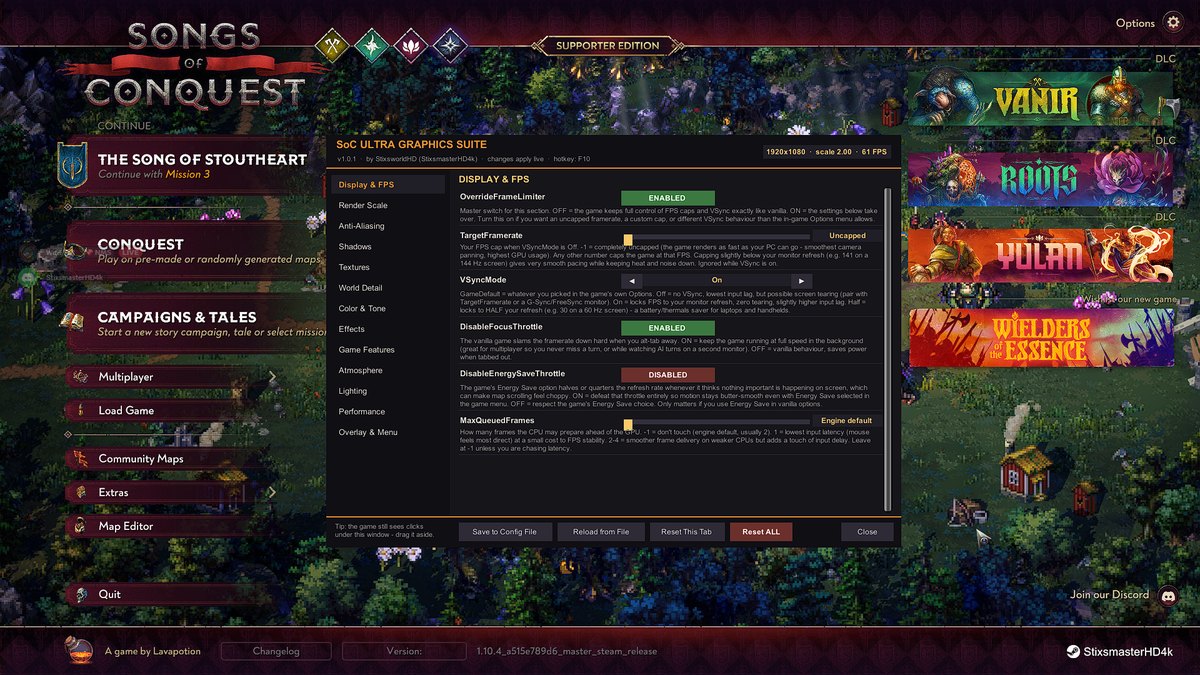
The F10 menu. Top-right shows the live readout ( 1920×1080 · scale 2.00 · 61 FPShere — 2.00× supersampling). The footer buttons are your save/load/reset controls.Done — but read onThe mod ships with safe, better-than-vanilla defaults (sharper shadows, 16× anisotropic filtering, higher LOD persistence). Everything spicier is opt-in. The sections below tour the menu, the config file, and four ready-made loadouts.


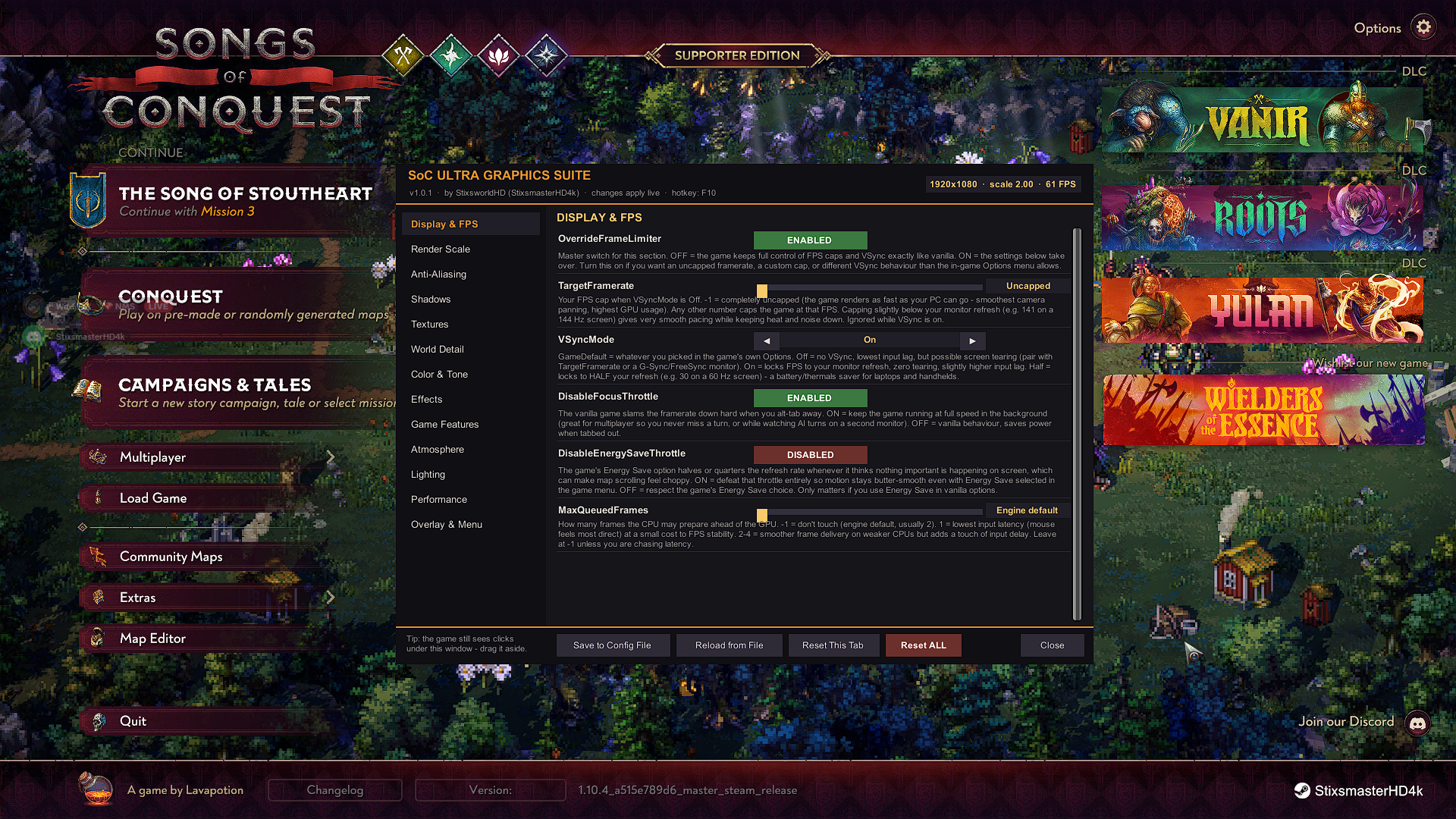
| Tab | What lives there |
|---|---|
| Display & FPS | Uncap FPS entirely or cap anywhere up to 1000 · force VSync Off/On/Half · kill the brutal alt-tab throttle · defeat the Energy-Save refresh divider · queued-frames latency tuning. |
| Render Scale | Force 3D resolution scale 0.25×–2.00× supersampling · upscaling filter incl. AMD FSR 1.0 (all GPU brands) with a sharpness dial · Nearest-Neighbor for the pixel-art faithful · UI always stays native-crisp. |
| Anti-Aliasing | Hardware MSAA up to 8× · per-camera post AA: FXAA / SMAA Low-Med-High / TAA · banding-killing dithering — forceable on any quality preset. |
| Shadows | Shadow maps up to 8192 (vanilla ≈2048) boosted out of the box. Distance to 500, up to 4 cascades, soft shadows and bias tuning are explicit opt-ins that default to GameDefault — see the black-terrain note. |
| Textures | Force 16× anisotropic filtering everywhere (vanilla ground goes muddy at distance) · full-res textures on any preset — or crush texture memory for 2 GB cards. |
| World Detail | 2× LOD persistence · decorative flora/clutter density to 2× vanilla · ambient critter density to 3× (or 0 for silence). |
| Color & Tone | ACES / Neutral filmic tonemapping · exposure, contrast, saturation, hue, white balance · HDR pipeline forcing · max-precision 64-size color LUT. All neutral until you move a slider. |
| Effects | Full bloom takeover (intensity/threshold/scatter/HQ filtering) · vignette · chromatic aberration · 10 film-grain stocks · motion blur · Panini projection · lens distortion · force post-processing on cameras that had it disabled. |
| Game Features | Tri-state force for the game's own Outlines, atmospheric Fog and See-Through silhouettes — run them on any preset or strip them for a clean diorama look. (Fog of war is a different system and is never touched.) |
| Atmosphere | Cloud-shadow drift speed 0–5× · cloud coverage 0–2×. Frozen skies, sunny days, or storm-chaser time-lapse. |
| Lighting | Per-object dynamic light limit up to the engine max of 8 — night towns and big spell fights show every torch — or strip lights for FPS. |
| Performance | Incremental-GC frame budget (kills long-session micro-stutter) · async GPU-upload tuning · particle raycast budget. |
| Overlay & Menu | Rebindable hotkey · menu scaling for 4K/couch · corner FPS overlay with average and 1% lows — perfect for A/B-testing your settings. |
The footer buttons
- Save to Config File
- Writes the current live settings to the
.cfg. Live changes are session-only until you save. - Reload from File
- Reads the
.cfgback in and applies it — this is how you hand-edit the file while the game runs. - Reset This Tab / Reset ALL
- Back to mod defaults, per tab or wholesale.
- Close
- Same as F10. Tip from the menu itself: the game still sees clicks under the window — drag it aside.
BepInEx\config\stixsworldhd.songsofconquest.ultragraphics.cfg
Every menu setting lives here too, with the same plain-English explanation, its type, default, and allowed min/max range or value list. Edit it with any text editor while the game is closed — or edit it live and press Reload from File in the menu. Delete the file at any time to regenerate pristine defaults on next launch.
Cinematic Ultra strong GPU
RenderScale override On at 1.50 · MSAA ×4 · SMAA_High · shadows 8192/4096 · SoftShadows ForceOn (High) · LODBias 3.0 · decoration density 1.5 · Tonemapping ACES · MaxAdditionalLights 8. Optionally try ShadowDistance 200 + CascadeCount 4 — if terrain goes black at night, set CascadeCount back to 0 (why).
Balanced Beauty the defaults, basically
SMAA_High · shadows 4096/2048 @ 120 · 16× aniso · LODBias 2.0. Better than vanilla High for a couple of FPS.
FSR Performance older GPU / handheld
RenderScale override On at 0.65 · UpscalingFilter FSR1, sharpness 0.9 · shadows 1024/512 · SoftShadows ForceOff · MaxAdditionalLights 2 · Half VSync for thermals.
Pixel Purist
RenderScale 0.50 + NearestNeighbor filter · PostProcessAA Off · CameraDithering ForceOff · MotionBlur Off. Chunky, faithful, fast.
- Upgrading from v1.0.0?
- Delete the old
.cfg(or setCascadeCount=0,ShadowDistance=0,ShadowDepthBias=-1,ShadowNormalBias=-1,SoftShadows=GameDefault) — the old file carries v1.0.0's riskier shadow defaults. v1.0.1 defaults these to GameDefault so black night-terrain can never happen out of the box. - Preset changes can't undo you
- The plugin hooks the game's own graphics manager and re-asserts your overrides the instant the game touches anything — switching the in-game quality preset never silently reverts the mod.
- Update-proof by design
- Zero compile-time references to game code; every hook resolves by name at runtime and is
individually sandboxed. If a game patch renames something, that one feature idles (the log
shows
SKIPPED) while everything else keeps working. - Multiplayer
- Purely visual / presentation-side — rendering pipeline, post-processing, frame pacing. The game simulation is never touched.
- Uninstall
- Delete
StixsworldHD.SoCUltraGraphics.dllfromBepInEx\plugins. Vanilla returns instantly; delete the.cfgtoo if you want a truly clean slate.